What’s a visual diff?
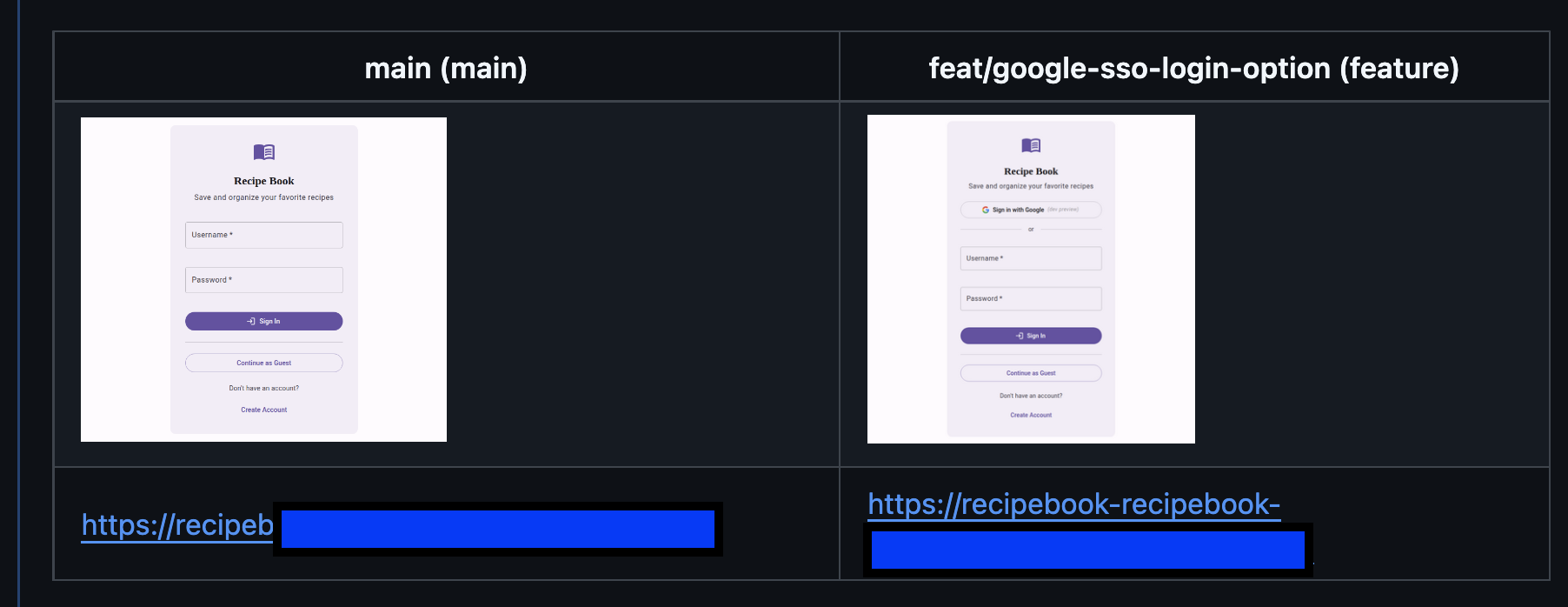
Similar to a regular git diff, a visual diff shows what changes were made between two branches. You might want to see a visual diff of a frontend change in a PR, so a code reviewer can briefly see what changes you made, and what the same route looks like currently.
What components do you need to capture one?
In this implementation, we’re generating visual diffs via GitHub Actions. Each before/after comparison will get posted as a comment on its respective GitHub PR.
To get these set up, you’ll need:
- A Claude Pro or Max subscription, or API key
- A GitHub repo (in which you’re an admin)
- A GitHub API key
- Remote PR environments (try Shipyard and its GitHub Action)
How to automate visual diffs for every PR
We built a sample workflow that captures what changed visually in a PR. Here’s a high-level overview of this pipeline:

Using the git diff
We’re going to start with the actual git diff as the foundation for our visual diff. This pipeline works best for atomic PRs since it captures a single before/after. It’s intended for code changes that touch the frontend.
Claude Code is useful here, since it can determine the URL route from the git diff. You can also do this programmatically, but that may be a tougher implementation depending on how your app’s files are named and organized.
Where do you preview your branch(es)?
Getting a visual diff requires an environment that previews your new feature/code changes. Depending on the complexity of this feature, you can use Netlify or Vercel preview links. For changes that impact your whole stack (e.g. a React component, anything that touches your DB), you’ll need a full-stack ephemeral environment.
For simplicity, we used Shipyard in our implementation. Here’s how to set it up. You’ll want to store your Shipyard API token as a repository secret.
To get an accurate before/after of main vs. the PR branch, we’ll need an environment spun up for each one. Using the Shipyard GitHub Action, we can get the URL for the feature branch from an env var, which will be env.SHIPYARD_ENVIRONMENT_URL. The URL for the main branch will be constant, so you can store it as an env var in your repo variables and reference it in the workflow like vars.SHIPYARD_MAIN_URL.
Automating the screenshots
Once you have your URL routes and base environment URLs, you can use a browser automation tool to visit the environment, click the right buttons/enter inputs, and take a screenshot. The Playwright MCP makes this really straightforward with Claude Code.
We’ll install and configure the Playwright MCP earlier on in our pipeline, then add a prompt for Claude to use it to visit our feature on the PR and main environment, and take screenshots of each.
The image hosting problem
You’ll want to get your before/after images rendered in Markdown for the visual diff comment, and there are a few different options you have for storing these images. An S3 bucket is an elegant choice. Storing the image in GitHub Packages won’t give you a link that enables rendering.
For simplicity, we went with a separate branch on the repo, named screenshots (this way we weren’t committing images to the feature branches).
Using the GitHub CLI in the Actions workflow, we can check out the screenshots branch, commit the images to a directory there, and use that URL to reference the image when we generate a Markdown comment.
Posting repo comments
At this stage, we’ll create a HTML template, and use variables to populate the links and images. We’ll use the GitHub CLI to post the comment to the current PR. In this layout, we’re adding each image to a column in a table.
BODY=$(cat <<EOF

<table>
  <tr>
    <th>${{ github.base_ref }} (main)</th>
    <th>${{ github.head_ref }} (feature)</th>
  </tr>
  <tr>
    <td><img src="$BASE_URL" width="50%"/></td>
    <td><img src="$FEATURE_URL" width="50%"/></td>
  </tr>
  <tr>
    <td><a href="$MAIN_ENV_URL">$MAIN_ENV_URL</a></td>
    <td><a href="$PR_ENV_URL">$PR_ENV_URL</a></td>
  </tr>
</table>
EOF
)
Limiting which PRs we generate visual diffs for
It doesn’t make sense to run this workflow on every single PR. Backend-only code changes, patches, or other non-frontend-heavy PRs can be excluded.
We can set another trigger condition in our Action workflow. One option is making a PR label for Visual diff and using the label as a trigger.
on:
  workflow_dispatch:
  pull_request:
    types: [opened, synchronize, labeled]
And setting the label’s name as the condition:
jobs:
  analyze-diff:
    if: |
      github.event_name == 'workflow_dispatch' ||
      contains(github.event.pull_request.labels.*.name, 'visual diff')
The final workflow
This is the resulting workflow of the components above. Test it out by opening a PR with changes to a frontend component and giving it the label visual diff.
name: Visual Diff
on:
  workflow_dispatch:
  pull_request:
    types: [opened, synchronize, labeled]

jobs:
  analyze-diff:
    if: |
      github.event_name == 'workflow_dispatch' ||
      contains(github.event.pull_request.labels.*.name, 'visual diff')
    runs-on: ubuntu-latest
    permissions:
      pull-requests: write
      contents: write
      id-token: write

    steps:
      - uses: actions/checkout@v4
        with:
          fetch-depth: 0
          token: ${{ secrets.GH_TOKEN }}

      - name: Setup Node.js
        uses: actions/setup-node@v4
        with:
          node-version: '20'

      - name: Install Playwright browsers
        run: npx playwright install chromium --with-deps

      - name: Integrate Shipyard
        uses: shipyard/shipyard-action@1.0.0
        with:
          api-token: ${{ secrets.SHIPYARD_API_TOKEN }}
          timeout-minutes: 10

      - name: Write MCP config
        run: |
          mkdir -p /tmp/mcp
          cat > /tmp/mcp/config.json << 'EOF'
          {
            "mcpServers": {
              "playwright": {
                "command": "npx",
                "args": ["@playwright/mcp@latest", "--headless"]
              }
            }
          }
          EOF

      - uses: anthropics/claude-code-action@v1
        env:
          GITHUB_TOKEN: ${{ secrets.GH_TOKEN }}
          SHIPYARD_ENVIRONMENT_URL: ${{ env.SHIPYARD_ENVIRONMENT_URL }}
          SHIPYARD_MAIN_URL: ${{ vars.SHIPYARD_MAIN_URL }}
        with:
          anthropic_api_key: ${{ secrets.ANTHROPIC_API_KEY }}
          claude_args: |
            --max-turns 20
            --allowedTools "Bash" "mcp__playwright__*"
            --mcp-config /tmp/mcp/config.json
          prompt: |
            You are a visual QA agent. Follow these steps:

            1. Run: git diff origin/${{ github.base_ref }}...HEAD --name-only
               Identify the most likely frontend route that changed.

            2. Take a screenshot of the feature branch environment:
               URL: ${{ env.SHIPYARD_ENVIRONMENT_URL }}/<inferred-route>
               Save to: /tmp/screenshots/pr-${{ github.event.pull_request.number }}-feature.png

            3. Take a screenshot of the main environment at the same route:
               URL: ${{ vars.SHIPYARD_MAIN_URL }}/<inferred-route>
               Save to: /tmp/screenshots/pr-${{ github.event.pull_request.number }}-base.png

            Output the inferred route on the last line in this exact format:
            ROUTE=/your-route

      - name: Commit screenshots to screenshots branch
        id: upload
        run: |
          PR_NUM="${{ github.event.pull_request.number }}"
          FEATURE_PATH="/tmp/screenshots/pr-${PR_NUM}-feature.png"
          BASE_PATH="/tmp/screenshots/pr-${PR_NUM}-base.png"
          FEATURE_FILE="pr-${PR_NUM}-feature.png"
          BASE_FILE="pr-${PR_NUM}-base.png"

          git config user.name "github-actions[bot]"
          git config user.email "github-actions[bot]@users.noreply.github.com"
          git remote set-url origin https://x-access-token:${{ secrets.GH_TOKEN }}@github.com/${{ github.repository }}.git

          git fetch origin screenshots
          git checkout screenshots

          mkdir -p screenshots
          cp $FEATURE_PATH screenshots/$FEATURE_FILE
          cp $BASE_PATH screenshots/$BASE_FILE
          git add screenshots/$FEATURE_FILE screenshots/$BASE_FILE
          git commit -m "screenshots: PR #${PR_NUM}"
          git push origin screenshots

          FEATURE_URL="https://github.com/${{ github.repository }}/blob/screenshots/screenshots/$FEATURE_FILE?raw=true"
          BASE_URL="https://github.com/${{ github.repository }}/blob/screenshots/screenshots/$BASE_FILE?raw=true"

          echo "feature_url=$FEATURE_URL" >> $GITHUB_OUTPUT
          echo "base_url=$BASE_URL" >> $GITHUB_OUTPUT

      - name: Post PR comment with screenshots
        run: |
          FEATURE_URL="${{ steps.upload.outputs.feature_url }}"
          BASE_URL="${{ steps.upload.outputs.base_url }}"
          PR_ENV_URL="${{ env.SHIPYARD_ENVIRONMENT_URL }}"
          MAIN_ENV_URL="${{ vars.SHIPYARD_MAIN_URL }}"

          BODY=$(cat <<EOF

          <table>
            <tr>
              <th>${{ github.base_ref }} (main)</th>
              <th>${{ github.head_ref }} (feature)</th>
            </tr>
            <tr>
              <td><img src="$BASE_URL" width="50%"/></td>
              <td><img src="$FEATURE_URL" width="50%"/></td>
            </tr>
            <tr>
              <td><a href="$MAIN_ENV_URL">$MAIN_ENV_URL</a></td>
              <td><a href="$PR_ENV_URL">$PR_ENV_URL</a></td>
            </tr>
          </table>
          EOF
          )

          gh pr comment ${{ github.event.pull_request.number }} \
            --repo ${{ github.repository }} \
            --body "$BODY"
        env:
          GITHUB_TOKEN: ${{ secrets.GH_TOKEN }}
Do it yourself!
Want to get the same workflow set up on your PRs? As long as you have a Claude subscription, you can do this for your repo pretty easily. Kick off a free 30-day Shipyard trial to get full-stack previews of every branch, which you can use for this workflow, as well as testing, QA, and stakeholder review.
Good luck, happy building!